
In a significant move, Google is finally giving Gmail users the long-awaited ability to change their email addresses without losing access to their data or starting a new account. This shift opens new flexibility for millions around the world who have been tied to the same email name for years and now want a fresh identifier that matches their personal or professional identity.
This new feature is being rolled out gradually, meaning it might not land in every account immediately. But the change marks one of the biggest updates to Gmail’s core identity system in years and could redefine how people think about their permanent email credentials.
What the New Gmail Address Change Feature Means for Users
Traditionally, once you chose a Gmail address, that name became permanent. You could add recovery emails or account aliases, but the original @gmail.com address could not be changed. That has now begun to shift. Google’s support documents, first spotted in a non-English version, reveal that users will soon be able to select a new Gmail username while keeping the same underlying account.
Under the new system:
- The old Gmail address automatically becomes an alias linked to your account, meaning emails sent to either address will arrive in the same inbox.
- Both the old and new addresses will work to sign in to popular Google services like Gmail, YouTube, Maps, Drive, and Google Play.
- Your existing account data, from emails and photos to files and contacts, remains intact throughout the change.
This means you don’t lose your digital identity or history by choosing a more suitable address, whether for personal reasons, work, or a new phase in life.
Key Restrictions and Guidelines to Know
Google has put thoughtful limits around this functionality, likely to prevent misuse or confusion across its ecosystem. While the ability to adjust your Gmail address offers freedom, there are safeguards:
- Change Limits: Each Google account can change its Gmail address up to three times. That gives you a total of four unique email names over the lifespan of the account.
- Minimum Hold Time: After changing, you cannot delete or modify the new address for 12 months.
- Alias Ownership: Your old email remains associated with your account and cannot be claimed by anyone else.
- Legacy Displays: Older services like Calendar may still show the original address in certain contexts, for example, on past event invitations.
These rules help balance flexibility with stability, ensuring that users don’t bounce between addresses too frequently while also safeguarding the identity tied to the inbox.
How This Compares to Past Gmail Address Policies
For many years, Gmail users have been forced to stick with the first address they chose when signing up. If that address was informal, outdated, or simply no longer a good fit, the only solution was to create a new account, migrate data, and update logins on every connected service. This was inconvenient and often discouraged users from improving their digital identity.
Google previously allowed changes if your account used a third-party email (like Yahoo or Outlook), but native Gmail address changes were off-limits. With this feature rolling out, that restriction is finally lifting for users with @gmail.com accounts.
The update is being introduced quietly, with initial support spotted on a help page not yet officially highlighted by Google’s mainstream announcement channels. Its gradual rollout suggests a phased introduction, with wider availability expected in the coming weeks and months.
The Bigger Picture for Gmail Users
This update has emotional resonance for many people. Some users have held onto Gmail addresses picked in their youth that might feel unprofessional today. Others might be rebranding, changing names after marriage or cultural reasons, or simply wanting an address that better reflects their current life stage.
In Nigeria and across Africa, Gmail is widely used not just for personal communication but also for formal interactions in business, education, and social services. Being stuck with an old or awkward username has long been a frustration, especially when professional credibility is at stake. Allowing users to update this without forfeiting years of data is a meaningful step forward.
Online communities quickly reacted to news of the change, with some users celebrating the newfound flexibility and others debating how the alias system will work in practice. Discussions highlight that while the rollout isn’t universal yet, anticipation is high and many people are ready to take advantage of the new option as soon as it appears in their account settings.
Google’s decision to roll this feature out first through support documentation in languages like Hindi hints at a global rollout strategy that takes local markets into account before widespread advertising. This approach may help ensure a smoother transition and allow Google to gather feedback from different regions before making the feature fully public.
How to Change Your Gmail Address When the Feature Appears
Once available for your account, here’s how the process typically works:
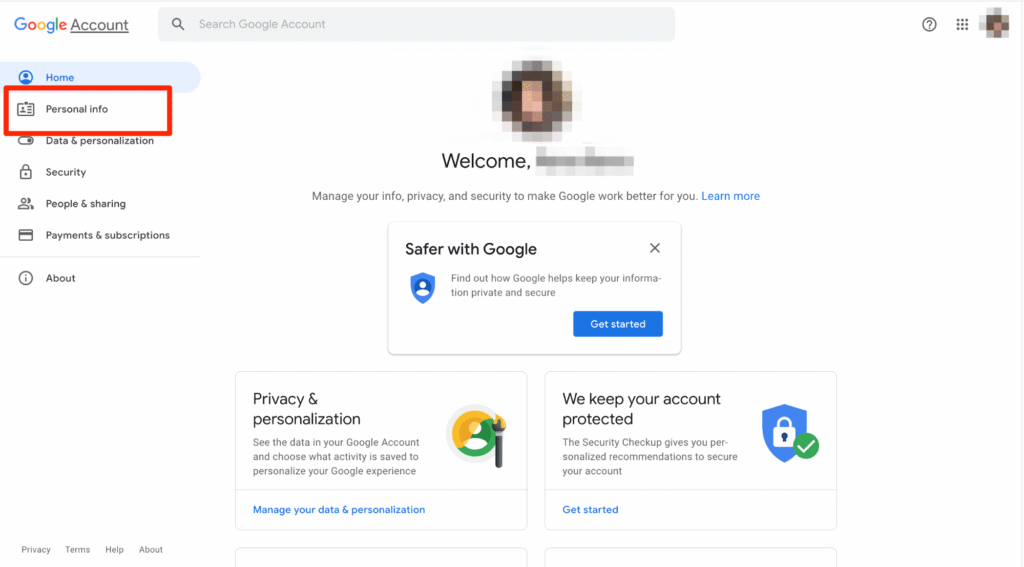
- Sign in to myaccount.google.com with your existing Gmail address.
- Go to your Personal Information settings.
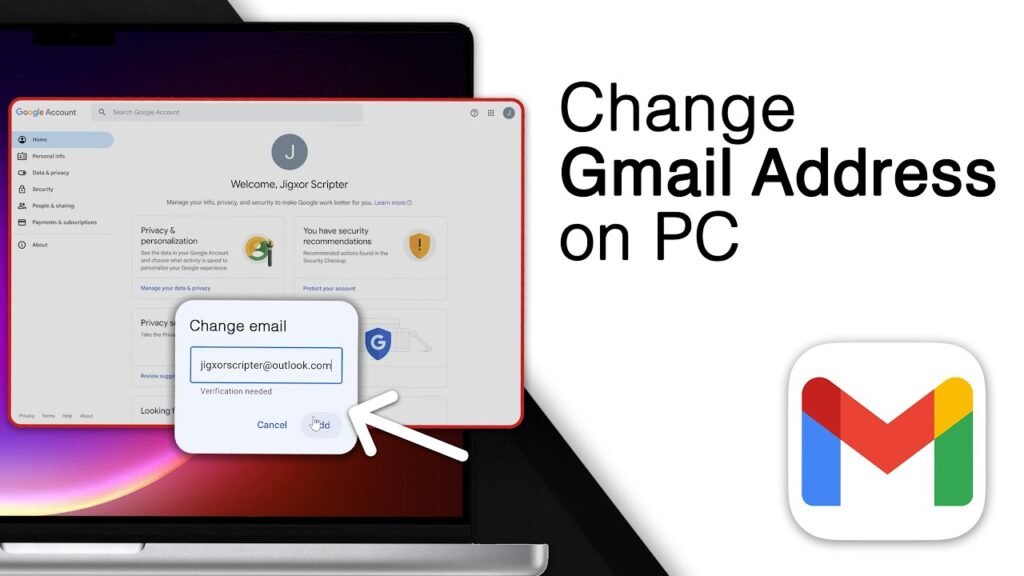
- Under the Email section, look for the option to change your Gmail address.
- Enter your desired new address and follow the on-screen instructions to complete the process.
If this option doesn’t appear yet, it simply means the feature has not reached your account, and you should check back later.
As this feature becomes more widely available, users are encouraged to choose new addresses carefully, keeping in mind professional use and long-term identity needs. An email address is often one of the first digital identifiers people see, so having control over that choice is increasingly important.
This change signals a new era in how email identities are managed, giving users more control without sacrificing continuity or data security. It’s a change that many have waited years for, and one that could reshape the way people view their digital footprint in the decade ahead.
Join Our Social Media Channels:
WhatsApp: NaijaEyes
Facebook: NaijaEyes
Twitter: NaijaEyes
Instagram: NaijaEyes
TikTok: NaijaEyes